Windows desktop automation • No coding required

Build powerful desktop automations without coding.

Click Recorder Studio helps you record mouse and keyboard actions, review them visually, add smart image-based steps, and replay repeatable Windows workflows with timing control.

7-day trialLocal workflowsManual activationWindows desktop app
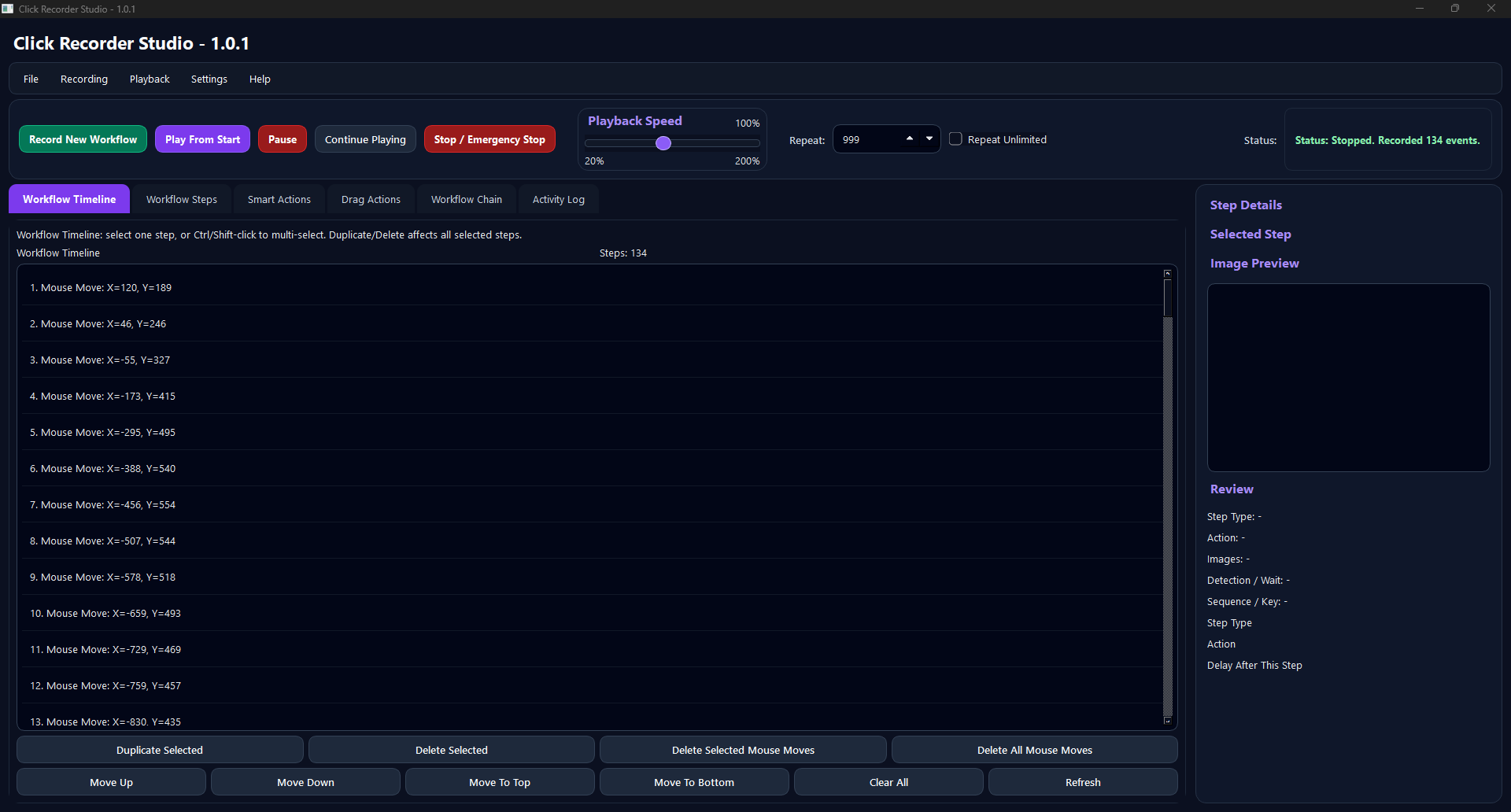
Click Recorder Studio main dashboard faithful placeholder

Faithful placeholder generated from the current app labels. Replace with real captured screenshot before final public traffic.

Record New Workflow
Perform your task
Stop
Review in Workflow Timeline
Play From Start
Pause / Continue
Append more steps
Save workflow

Features

Practical tools for repetitive Windows work.

Workflow recording

Capture clicks, mouse movement, keyboard actions, delays, and repeatable workflow steps in a visual timeline.

Visual timeline review

Review recorded actions, select a step, resume from a point, duplicate, delete, or clean unwanted mouse-move steps.

Smart Actions

Add image-based steps that wait for a visual target before clicking or running a configured action.

Drag Actions

Create controlled drag steps with start and end points for workflows that need more than simple clicks.

Workflow Chains

Combine multiple workflow files, set repeats, and run a sequence for longer repetitive tasks.

Local-first design

Workflows, captures, logs, and settings are stored on your PC in the local app data folder.

How it works

Record once. Review clearly. Replay carefully.

  1. Start recordingClick Record New Workflow and perform a small test task first.
  2. Stop and reviewPress F8 or Stop / Emergency Stop, then review the Workflow Timeline.
  3. Test playbackUse Play From Start, Pause, Continue Playing, or Resume From Highlighted.
  4. Refine and saveAppend more steps, edit timing, add Smart Actions, then save your workflow.

Administrator permission

Click Recorder Studio may request Administrator permission so it can reliably record and replay actions in apps that also run with elevated permissions.

For normal desktop workflows, standard mode is safer. Admin mode is mainly useful when the app you want to automate also needs elevated access.

Screenshots

True-to-life app visuals.

These are faithful screenshot placeholders generated from the current `main.py` labels and UI structure. They are not random mockups. Replace them with real app captures before paid traffic.

Main dashboardActivation dialogWorkflow TimelineWorkflow StepsSmart ActionsWorkflow Chain

Launch offer

$9.99 lifetime launch license

Direct website launch using PayPal/manual activation. Microsoft Store is not the launch route for this package.

  • 7-day free trial
  • Manual website activation
  • Workflow recording and playback
  • Smart Actions and Workflow Chains
  • Local files stored on your PC

$9.99

Launch offer

Buy with PayPal

Replace this PayPal link with your final PayPal checkout/payment link before launch.

After purchase: send your Machine Code and PayPal email/order reference to support@clickrecorderstudio.com. Your activation code will be sent back after verification.
Download

Download the free trial installer.

Upload the final installer to the downloads folder and update the button link before going public.

Download Free Trial

Windows security note

If the app is not code-signed yet, Windows may show a security warning. This page does not claim code signing. Explain the installer source clearly and keep the download link hosted only on your official domain.

FAQ

Common questions

Is activation instant?

No. The launch flow is manual. After PayPal purchase, send your Machine Code and payment email/order reference to support. The activation code is sent back after verification.

Does the app upload my workflows?

Current local builds store workflows, captures, settings, and logs locally on your PC.

Why does the app need Administrator permission?

Admin mode can help when recording or replaying actions in apps that also run with elevated permissions. For normal workflows, standard mode is safer.

Is this for game cheating or bypassing services?

No. Click Recorder Studio is positioned for lawful desktop productivity and repetitive Windows workflow automation. Do not use it to violate any app, game, platform, or service terms.